Metadata
- Date :: 15-04-2025
- Tags :: web-dev
Notes
🎨 CSS Cascade - Deep Dive Notes
🌊 Why “Cascading” in Cascading Style Sheets?
The term “cascade” refers to the process of resolving conflicts between multiple CSS rules targeting the same HTML element.
Imagine a waterfall, where water (styles) flows from top to bottom. At each level, the browser decides which style “wins” based on certain rules. This flow of determining which styles get applied is what makes CSS a cascading system.
🧩 Why is the Cascade Important?
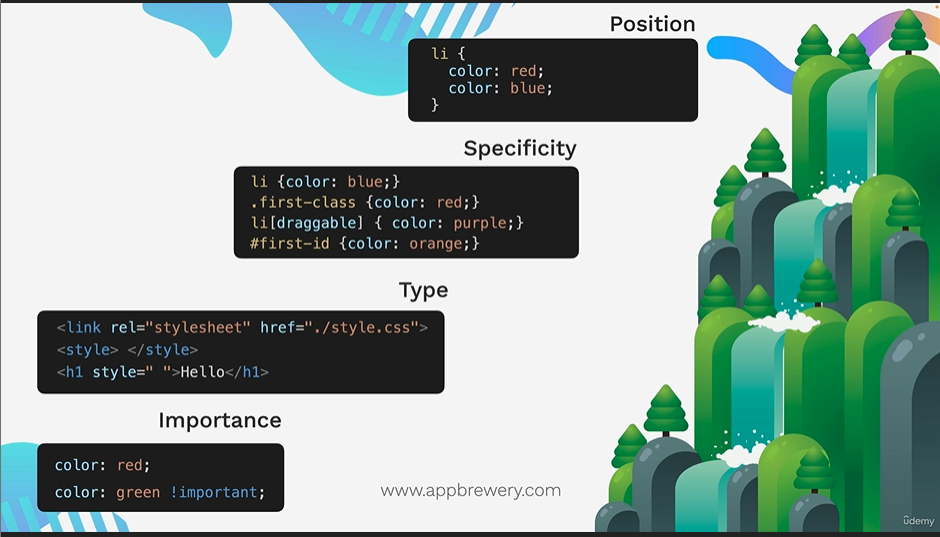
When multiple styles target the same element, the browser must decide which one to apply. This decision is made using a combination of:
-
Position (Order in the stylesheet)
-
Specificity (How specific the selector is)
-
Type (Where the CSS is written - inline, internal, external)
-
Importance (The use of
!important)
Understanding how these factors work is essential for writing predictable and maintainable CSS.
🧷 1. Position (Order of Appearance)
If multiple rules target the same element and have equal specificity and type, the rule that appears last overrides the earlier ones.
🧪 Example:
li {
  color: red;
  color: green; /* higher priority than red */
}

li {
  color: blue; /*highest priority */
}
✅ The text will be blue, because it’s defined later in the stylesheet.
🔔 This applies within the same type of stylesheet (e.g., within the same external or internal stylesheet).
📐 2. Specificity
Specificity is a way of determining which rule is more “targeted” or “precise”.
📊 Specificity Hierarchy:
From lowest to highest:
-
Element selector (e.g.,
li,h1) -
Class selector (e.g.,
.menu) -
Attribute selector (e.g.,
[type="text"]) -
ID selector (e.g.,
#header)
🧪 Example:
HTML:
<li id="first-id" class="first-class" draggable="true">Item</li>CSS:
li {
  color: green;
}

.first-class {
  color: blue;
}

li[draggable] {
  color: purple;
}

#first-id {
  color: orange;
}
✅ Final color: orange, because the ID selector is the most specific.
📌 Important Notes:
-
Specificity does not care about position unless there’s a tie.
-
Inline styles are not part of specificity—they’re handled separately by type.
🗂️ 3. Type of CSS Rule
There are three places where you can write CSS, and they are prioritized in the following order:
| Type | Priority |
|---|---|
| External | Lowest |
| Internal | Medium |
| Inline | Highest |
🧪 Example:
HTML:
<h1 style="color: blue;" id="my-id" class="title">Hello</h1>CSS (External):
#my-id {
  color: green;
}
✅ Final color: blue, because inline style wins, even though the ID selector is more specific.
❗ 4. Importance (!important)
You can override any rule by using the !important flag.
🧪 Example:
h1 {
  color: red;
  color: green !important;
}
This rule will override:
-
Inline styles
-
ID selectors
-
Any rule unless another
!importantrule comes later and is more specific.
🚨 Caveat:
Use !important sparingly—it breaks the natural flow of the cascade and can make debugging more difficult.
🧠 Summary Table - CSS Cascade Priority
| Factor | Description | Rank |
|---|---|---|
!important | Always wins unless another !important is more specific | 1 |
| Inline | Inside the HTML element via style="" | 2 |
| ID Selector | Targets a unique element using #id | 3 |
| Class/Attr | Selects using .class or [attr=value] | 4 |
| Element | Simple element tag selector like p, li, etc. | 5 |
| Position | If specificity is equal, later rules win | 6 |
flowchart TD
id1[Position]
id2[Specificity]
id3[Type]
id4[Importance]
id1 --> id2 --> id3 --> id4
🎯 Practical Example Recap
Scenario 1:
<h1 class="heading" id="main-title">Hello</h1>CSS:
.heading {
  color: blue;
}

#main-title {
  color: green;
}
✅ Final Color: green – ID is more specific than class.
Scenario 2:
Two rules using classes:
.a-class {
  color: green;
}

.another-class {
  color: blue;
}
And HTML:
<h1 class="a-class another-class">Hello</h1>✅ Final color: blue, if .another-class is written later in the CSS. Same specificity ⇒ position wins.
Scenario 3:
<h1 id="an-id" style="color: blue;">Hello</h1>CSS:
#an-id {
  color: green;
}
✅ Final Color: blue – Inline > ID.
🔧 Challenge Highlights
Challenge: Apply different background colors using class and ID selectors without modifying HTML.
Instructions Recap:
-
Do not change the HTML.
-
Use selectors effectively:
.white-text,.inner-box,#outer-box. -
Apply styles in the right order to ensure the correct styles override.
Goal:
-
Text with
.white-text→color: white; -
.inner-box→background-color: red; -
#outer-box→background-color: purple; -
All
.boxelements → already havepadding: 10px;
Key Learnings:
-
Position matters when specificity is equal.
-
ID selectors override class selectors.
-
Use unique identifiers when possible.
-
The cascade applies within specificity categories too.
✅ Final Takeaways
-
Cascade = resolving conflicts between multiple CSS rules.
-
CSS decides which rule to apply using:
-
Specificity
-
Rule Type
-
Rule Position
-
!importantdeclarations
-
-
Use
!importantcarefully. -
Test and inspect in browser dev tools to troubleshoot.
-
Never memorize blindly—refer back when needed. Good programmers know where to find answers!