Metadata
- Date :: 11-04-2025
- Tags :: web-dev
Notes
๐ How the Internet Works โ Detailed Notes
๐ What is the Internet, Really?
-
Common Misconception:
- Many people think of the Internet as a โcloudโ or something abstract floating around in the air.
- Itโs often considered extremely complex or hard to understand.
-
Reality:
- At its core, the Internet is just a vast network of wires (and other transmission media) that connect computers all around the world.
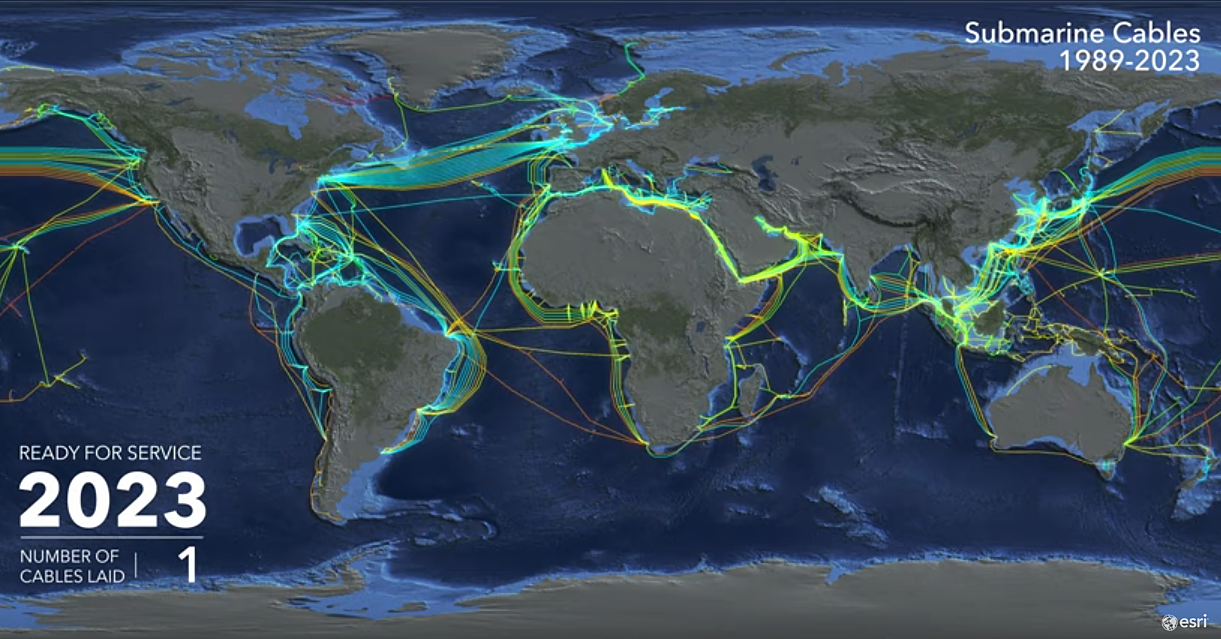
- These โwiresโ include ethernet cables, fiber optic cables, and undersea cables that physically link machines together.
โ Example:
Your computer in New York can communicate with a server in Japan because they are both connected to this global wire network.
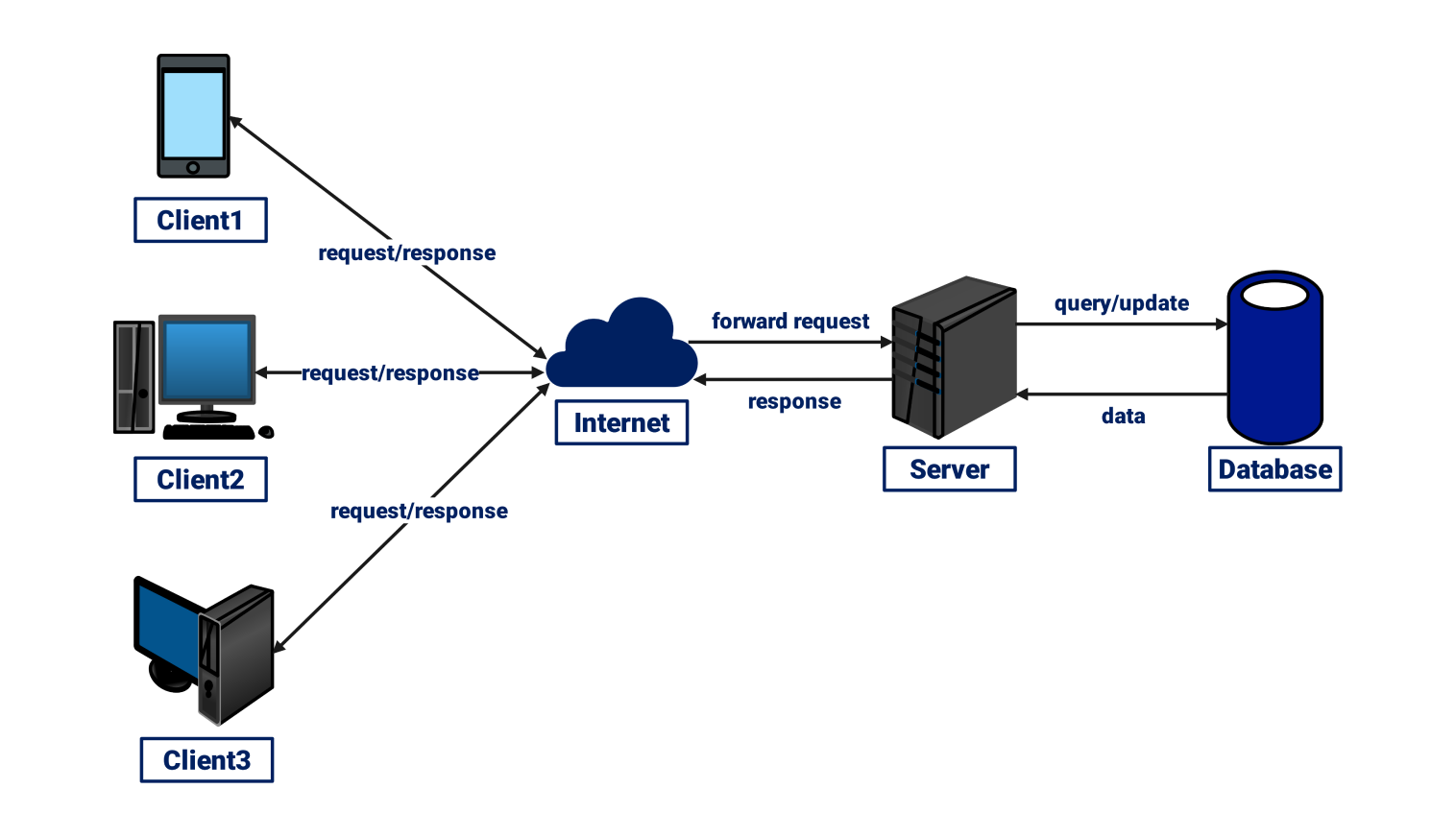
๐ฅ๏ธ Clients and Servers: Two Key Roles
-
Client:
- Any computer (including your phone or tablet) that requests data from another computer on the Internet.
- You are a client when you use a browser like Chrome, Firefox, or Safari to visit a website.
-
Server:
- A computer thatโs always online (24/7) and ready to respond to requests from clients.
- Servers store and deliver the files, data, and media that make up websites.
- Theyโre essentially the libraries of the Internet, always open and organized to help clients get what they need.
โ Analogy:
Imagine a giant digital library (the server) where visitors (clients) can come in any time and request specific books or documents (web pages, images, videos, etc.).
๐ How Do We Access Websites? The Step-by-Step Process
Letโs break down what happens when you type a website like google.com into your browser:
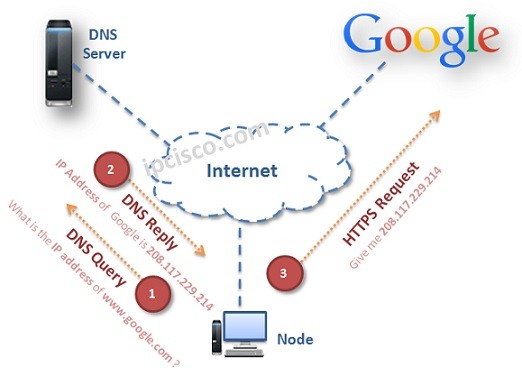
Step 1: ๐ค Entering the Website Address (Domain Name)
- You type
google.cominto your browserโs address bar. - This domain name is human-friendly, but computers donโt understand it directly.
Step 2: ๐ก Sending a Request to Your ISP
- Your browser sends a request to your ISP (Internet Service Provider) โ the company that provides you Internet access.
- In the US: AT&T, Comcast
- In the UK: BT, TalkTalk
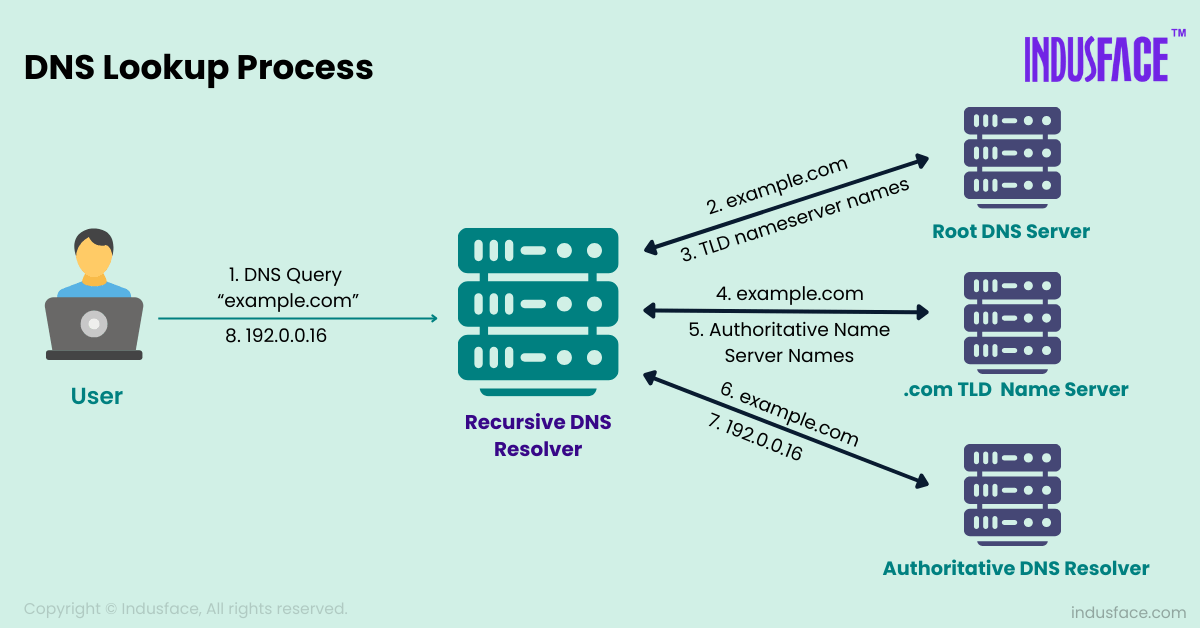
Step 3: ๐ DNS Lookup (Phone Book of the Internet)
- The ISP forwards the request to a DNS (Domain Name System) server.
- The DNS server looks up the domain name (e.g.,
google.com) in its database to find the corresponding IP address.
โ Analogy:
Think of DNS as a digital phone book. You know a personโs name (Google), but you need their number (IP address) to call them.
Step 4: ๐งญ Getting the IP Address
- Once the DNS server finds the IP address (e.g.,
142.250.72.206for Google), it sends it back to your computer. - Now your browser knows exactly where to send the request to get Googleโs homepage.
Step 5: ๐จ Sending a Direct Request to the Server
- Your browser now sends a request directly to the Google server (using its IP address).
- The server receives this and responds with the websiteโs content โ HTML, CSS, JavaScript files, images, etc.
- Your browser assembles and displays the page.
๐ Try It Yourself:
Go to nslookup.io and typegoogle.comto see the actual IP address.
๐ The Global Internet: Undersea Cables
- You may wonder: How does my computer in India talk to a server in the US?
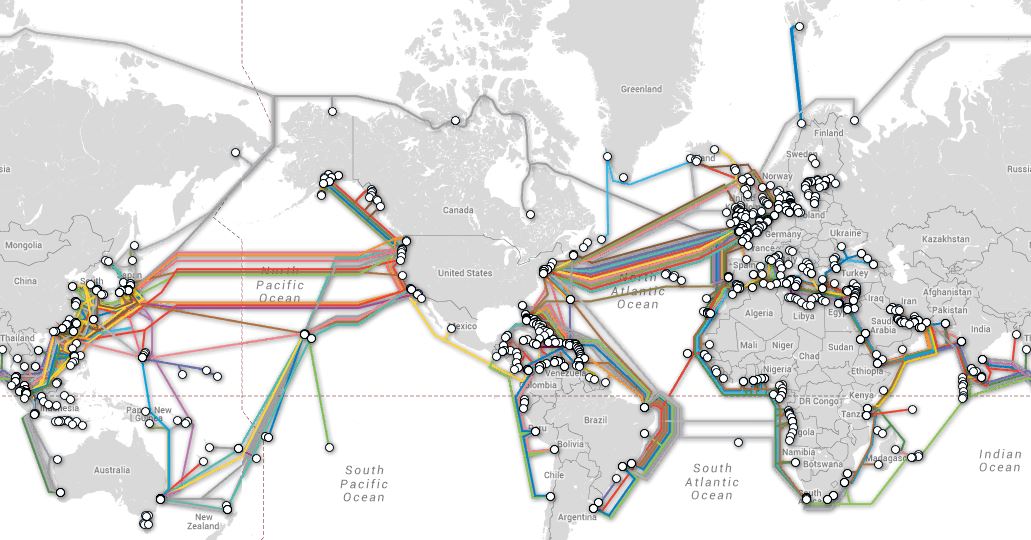
- The answer lies in undersea cables, which are massive fiber optic cables laid on the ocean floor.
๐งต About Undersea Cables:
- Connect continents across oceans.
- Made of hundreds of strands of fiber optic glass, each strand thinner than a human hair.
- Transmit data using light signals (lasers), allowing speeds up to 400 Gbps per fiber.
โ Resource:
Visit submarinecablemap.com to view all the undersea cables connecting different parts of the world.
๐ฌ What is an IP Address?
- Every device connected to the Internet has a unique IP address (e.g.,
192.168.1.1). - IP stands for Internet Protocol.
- Itโs like the postal code or street address of a device.
- Required so that data knows where to go and come back from.
๐ง IPv4 vs IPv6:
Most IPs you see look like192.0.2.1(IPv4), but as we run out of those, newer ones look like2001:0db8:85a3::8a2e:0370:7334(IPv6).
โก How Fast Is the Internet?
- Data travels at nearly the speed of light through fiber optics.
- Your click on a website button sends electronic signals across thousands of miles almost instantly โ and returns a response in milliseconds!
๐ Summary โ The Internet in a Nutshell:
| Concept | Summary |
|---|---|
| Internet | A massive system of interconnected computers via physical wires. |
| Client | The device/user requesting data (your computer/phone). |
| Server | The device responding with data (Google, Facebook servers, etc.). |
| ISP | Your Internet provider who connects you to the Internet. |
| DNS | The phone book of the Internet โ translates domain names into IP addresses. |
| IP Address | A unique identifier (like an address) for each device on the Internet. |
| Undersea Cables | Massive fiber optic cables that connect continents and carry global data traffic. |
๐ก Final Thoughts
- The Internet isnโt magic โ itโs a powerful combination of hardware and software working together.
- It relies on decades of infrastructure, standard protocols (like TCP/IP), and amazing engineering.
- Every Google search, video call, or tweet happens because your device is talking to another device somewhere in the world through these invisible pathways of light and electricity.